Tuesday, June 12, 2007

The $51 server.

It's been 6 months since I installed FreeNAS and it really has been like an appliance.  I back up my machine and my wife's machine with just a few batch files, based on robocopy.  I could get fancy with remote backup tools and so forth, but simple works.

I've been calling it $51 Server .  It started out as a white box pc that that I had custom built by MWave a few years back.  I had needed a Netware box for some Sybase Adaptive Server Anywhere testing and we bought a Dell Server with Novell Netware 5 on it.  It's an interesting story of how I ended up with that box, but if you want to skip the story, just jump here.

Netware was installed, but it needed to be configured.  The first thing it asked for was it's designation.  I considered naming it "One", but precious few would have caught the reference.   Usually when I get a server, I'll ask a random co-worker for the first one word that comes to mind.  I was talking to one our tech support staff and his word was "pumpkin". 

This bugged our IT manager to no end.  Normally, IT handles all of our server installs, and the server gets the name of some sort of predator.  Since I was the only one who knew Netware (which was a scary thought on many levels), the care and feeding of Netware box was my responsibility.

Getting back to Pumpkin.  After running it for a week, we had a somewhat urgent need for another Windows 2000 Server for a temporary remote access situation.  I wiped Pumpkin clean and IT installed Windows 2000 Server and named it Viper.

Temporary turned into permanent (about 6 years at this point) and I still needed a Netware box.  And of course, we did't have any more money in our budget for another server.  But we did have enough money to have a cheap whitebox built.  So for a couple of hundred, we got a Celaron 1ghz box with 256MB memory and a 20GB drive.  Video and sound were on the motherboard and we had a 3Com ethernet card that had outlived it's prior owner.  Using the usual method of selecting a server name, one of the QA people volunteered "moo" as the name.  She likes cows and it was short enough that you could easily type it with one hand with moving the hand.

Moo lasted 5 years without issues.   We used it test Sybase and it did was asked.  Our support for Sybase ended last fall and so ended our need for dedicated Netware Server.  The company sold it to me for $1.  I spent $50 on a 250GB hard drive and installed FreeNAS on it.

So for the whopping sum of $51, I have a NAS box that is completely managed by a simple web interface.


Technorati tags: , , , ,

Friday, June 08, 2007

User specific connection strings

Steve Harmon has a good tip on how to use ASP.NET 2.0's configSource to store connection strings in a file outside of the web.config.  You keep the user specific file out of source control and you eliminate conflicts when people use their own connection string settings.  He's not the only one to come up with that idea.

Shawn is dragged kicking and screaming into the year 2004

Shawn Gwin finally has a real blog.  As the president of the Tech Valley .Net Users Group (TVUG), it was about time that he started blogging.

Tuesday, June 05, 2007

TestDriven.NET and Visual Studio Express

There's been a lot of blog postings about Jamie Cansdale's legal issues with Microsoft in the last few days.  Jamie has a product called TestDriven.NET that integrates unit testing within the Visual Studio IDE.  The problem is that Jamie has integrated TestDriven.NET within Visual Studio Express and Microsoft would like him not to do that.

Visual Studio Express is the free version of Visual Studio 2005 intended for the hobbyist/student programmer.  Because it's free, Microsoft took a few steps to prevent VS Express from taking away sales from the other members of the Visual Studio product line.  Basically, you are not allowed to extend Visual Studio Express with additional functionality.

Jamie found to register TestDriven.NET so that it would work withing VS Express.  Jamie stated that he used published API calls, everything was above the board.  Information posted by Dan Fernandez (Lead Product Manager for Visual Studio Express) would indicate otherwise:

The TestDriven.NET product is implemented as a Visual Studio Add-In.  In the Visual Studio Standard, Professional, and Team System SKUs, TestDriven.NET is installed as an Add-In and gets loaded into the IDE through the Add-In Manager.  In the Visual Studio Express SKUs, because we disabled extensibility (macros, Add-ins, and VS Packages), the Add-In Manager is removed and therefore Add-Ins are not detected or loaded.  Jamie has created additional components specifically for the Express SKUs to work around this technical limitation.  He takes advantage of an extensibility point that allows user controls (such as a button class) to customize entries in the Properties window.  When his property extender gets called, he executes code that finds, loads and injects the TestDriven.Net assembly into the Express SKU’s running process, thus replacing the functionality of the removed Add-In Manager.  This explains why he instructs Visual Studio Express users to open the Properties window in order to enable TestDriven.NET.  Once his code is injected into the Express SKU’s running process it can add menu items, enable features that were disabled, and in general take over that instance of Express. These special loading mechanisms that Jamie has built exclusively for the Express SKUs are unauthorized workarounds to the SKUs’ technical limitations.

Right after VS 2005 was released, Microsoft contacted Jamie asked Jamie to remove support for VS Express from TestDriven.NET.  After many rounds of email and phone conferences, Jamie complied for a while.  Eventually he re-enabled support for VS Express and Microsoft is now using their lawyers to enforce their request.  You can read most of the emails and the legal correspondence here.

When I first read about this, my initial thought was Microsoft was sticking to the little guy.  That's really not the case here.  Microsoft spent a considerable amount of resources developing the Express line of Visual Studio products and it was clear from the start that you were not supposed to extend the architecture of the tool.  For that limitation, you have a powerful development environment that you could develop commercial applications with.

People have been making the argument that it's OK to extend the functionality because Microsoft is already doing it by releasing additional products (like Popfly) designed for VS Express.  That has nothing to with MS's requirement that third parties are prohibited from extending Express.  This isn't unique to Microsoft.  CodeGear does the same thing with Turbo Explorer lineup.  You can't install third party components into Turbo Delphi Explorer

Jamie appears to be stuck on the what specific part of the EULA is being violated.  I don't think it matters.  The request to pull VS Express from TestDriven.NET was a reasonable one and he should complied with it.

postscript...
It's entertaining to read the comments posted on Dan's blog, especially here.  While I'm not surprised by the number of people who just don't know the facts, there were many postings by people saying that MS vs Jamie was a reason to dump MS and only use open source tools. 

Give me a break!  If you are making decision on what tool to use over a clear cut EULA violation, you have rocks in your head.  You should be making that type of decision based on it being the right tool for the job.

Friday, May 18, 2007

Why is this man laughing?


There’s a story behind that picture and it’s pretty much what you would think it is.

Dave Anthony toasts his achievement after driving his truck on top of a Kent house he was demolishing. Anthony said "it was a hell of a way to kick off the Memorial Day weekend."

Somehow, it's not too surprising that alcohol was involved.  The full story can be read here.   I wonder how close he came to being a candidate for a Darwin Award?  At the very least, he should get an "Honorable Mention" for this stunt.

It gets better with the followup story:  Driving your pickup truck onto the roof of a house and getting your picture in the newspaper doesn't make a whole lot of sense when police want to talk to you about a $2,800 set of tires purchased with a stolen credit card.

Courtesy of Raymond Chen from The Old New Thing.

Tech Tags:

Time to get a new PC

My home PC died last Friday and I'm waiting for it's replacement to show up. I've had the machine for years and it's been running 24/7, something was bound to fail. The fan on the video card was starting to lock up and I'm pretty sure that the main hard drive is toast. It was a decent machine back in 2002, an Athlon XP 2000 with fast memory and drives.

The new box will be dual cores with lots of memory and RAID 5. I've lost 4 drives in the last year, I wont use another desktop without RAID. I looked at getting Dell, but I really didn't want to spend a lot of money. You can get cheap boxes from Dell, but not with what I wanted.

I like spec'ing out the components, you never know exactly what you will be getting from Dell. I've had good luck with custom boxes built by MWave. I basically picked out the components that I wanted and they assembled it and burned it in for me for a small fee. It's already been shipped, I should have it early next week

This is what I ordered:

  • Asus M2N-SLI Deluxe: A decent motherboard with everything I need on it, including RAID. The onboard sound board isn't the best one, but it will do for my needs. I'll probably salvage the Audigy card out of the dead machine if I need a better sound card.
  • AMD Athlon 64 X2 4800+ (Brisbane): Two cores and energy efficient. I never get the fastest CPU, I always bring down a few notches. The difference in speed will not be perceptable and I can spend the extra money on more memory, which will make the machine faster.
  • 2 GB Ram: With Vista, 2 GB is the bare minimum. I'll probably bump it up later
  • GIGABYTE GV-NX86T256D GeForce 8600GT 256MB 128-bit GDDR3 PCI Express x16 Video Card: It's fast, it's cheap, and it's got a big honking heat pipe to cool the card without a fan. Not having a fan means a quieter PC and one less moving part to break.
  • Maxtor 250GB SATA-300 drives: MWave had these drives fro $60, so I bought three of them for the RAID 5 array. With Maxtor's purchase by Seagate. it looks like these products were being discontinued.
  • Lite-On LH-18A1P 18X DVD RW drive: I've had good luck with Lite-On drives before and it was a good price. It's not their fastest writer, but it will be fast enough for the media that I'll be using for it
  • No floppy. The only time I have used a floppy in the last box was to flash the BIOS of the motherboard. If I can the new one to boot from a flash drive, I wont need the floppy. I may end up installing one as it's the typical way of installing RAID drivers when you do a Windows install. I could grab the floppy drive from thedead PC or get one that also has a memory card reader
  • Antec Sonta II case: I'v always liked Antec cases and power supplies and the Sonata is the right case for me. It's big enough to make working in the case easy, and it's very quiet. The main fan is 120mm, instead of 80mm. It can run slower (less noise) and push out more air than the 80mm fans. Another nice feature is that the fans and the hard drives are mounted on rubber, that really cuts down on the vibration noise.
  • Vista Home Premimum: I have mixed feelings about this one. I need more Vista hands on experience, but the horror stories are starting already. I could always install XP, if this OS is truly that awful, but I would prefer to work with Vista. This will also be my first experience with a "Home" labelled OS. I've been using XP Pro at home, but I rarely use the Pro functionality. I'm staying with the 32-bit version, even though the processor will support the 64-bit OS

Fortunately, the important files have been backed up. I put together a FreeNAS box a couple of months ago and I've been backing up source code and documents to it. The next time you buy a new PC, take the old one and toss FreeNAS on it. It just works.

Thursday, May 10, 2007

Is Microsoft Dead?

I was reading Mike Gunderloy's new blog, A Fresh Cup, and I came across a link to an article titled "Microsoft is Dead", by Paul Graham.  Paul's view is that Microsoft is no longer relevant and we live in "Web 2.0" world that Microsoft doesn't know how to play in.  He states that there are four things that killed Microsoft: Google, "the desktop is over", broadband Internet, the rise of Apple.  He's just plain wrong.

I'll give him Google.  Microsoft has never been able to catch up to Google in the search engine game.  I stil don't see how Google being the king of the hill for search engines means that Microsoft is dead.  That's like saying because apples are red, oranges suck.  It doesn't work that way.

People have been saying that the desktop is over for years.  Sun has been saying that, in one form or another, for the last 20+ years.  That has always felt like wishful thinking than future reality.  Lots of applications are well suited to run as web applications, but not all of them.  The desktop experience is just so much more richer in terms of the UI and the access to the machine than the browser experience.   Today's PC's have so much horsepower that it boggles the mind.  Why would you not want to use it?

Paul states that the rise of broadband Internet means that you have less of a need for desktop because you will faster access to the server.  All it really means is that your applications that get data from the Internet will run faster.  I use SourceGear's Vault for source control.  Vault runs a web service, but the client is a fat app.  When I changed my home ISP from TW RoadRunner to Verizon FiOS, I saw a decent performance boost when I used Vault from home to access files from the office.  Being a fat client, it can cache a lot of the data and save many round trip requests for data.  If it was a web only client, it would have been much slower, plus have all sorts of security headaches because the file system interaction. 

I have yet to see the "Web 2.0" equivalent to PhotoShop.  Silverlight opens the door to more robust web applications, but it still has limitations.  Oh wait, that's a Microsoft technology, better leave that one out.  What about office productivity applications.  Microsoft Office is a giant fat client, but so is Open Office.

What about the rise of Apple?  With the move to Intel CPU's and updated operating systems, the Apple Macintosh market share has increased over 38% within the last year.  Heady stuff and good for Apple.  Still, we are talking about going from roughly 4% of the market to around 6%.  When you view their rise in those terms, it's less of a threat to Windows.  He mentions Apple and then writes something that is just so wrong on many levels:

...Their victory is so complete that I'm now surprised when I come across a computer running Windows. Nearly all the people we fund at Y Combinator use Apple laptops. It was the same in the audience at startup school. All the computer people use Macs or Linux now. Windows is for grandmas, like Macs used to be in the 90s. So not only does the desktop no longer matter, no one who cares about computers uses Microsoft's anyway.

There are some seriously flawed statements there.  Just because the only people you see are using Macs, that doesn't apply to the entire population.  It just means that your sample set is not representative of the whole population.  I'm a computer guy and I have a few Macs and some Linux boxes.  I'm also a Windows developer and that's where most of my computer usuage occurs.  There last few lines are just insulting and are remarkably fact free.

Why do people get stuck in the useless us versus them argument?  The whole "Microsoft is Evil" argument is tired as well as the monoply charges.  There's enough room in the market place for various operating systems.  Just because you prefer one, doesn't mean it's the right choice for everyone else.

I usually ignore these types of articles, but this guy was just so wrong, it just jumped out at me.  It's clear he has an anti-Microsoft bias.  There's nothing wrong with that, but his reasoning had nothing behind it.  Paul, it's time to venture out of your "Web 2.0" bubble and see that the world is big enough everyone to play in.

Monday, May 07, 2007

Jeremy Clarkson does more than laugh at rice

I really wish I could get "Top Gear" here.  I can just watch that show for hours.  The only way I get to see any episodes is through YouTube.   I just came across this little gem:


Where Jeremy Clarkson destroys the worst modified car on the planet. He does more than laugh at rice, he takes action.

Friday, May 04, 2007

Ed Dague's blog has a new home

This is old news, but still worth mentioning.  Ed Dague's blog has moved from Blogspot to a new location hosted by the Albany Times Union.  If you want to learn how local news stations work, his blog is required reading.

Thursday, May 03, 2007

Domain name change

As of today, the address of this blog is now http://anotherlab.rajapet.net/.  The old name, http://anotherlab.blogspot.com, still works but you'll see the new name in your browser's address field.   I made the change after signing up for Google Apps.  I wanted to have a personal email address with my own domain and Google Apps will do that for free.  I've had rajapet.net parked at GoDaddy for the last few years (for a side project that never got off the ground), I figured I might as well use it.

After going through the steps with my domain registrar to map my domain name to Google's mail servers, it was then a trivial matter to add a CNAME Record to rajapet.net have it point back to ghs.google.com.  Once I verified that the registration had been posted to that series of tubes, I went in to the Blogger Admin page and assigned anotherlab.rajapet.net to the blog.

I signed up for Google Apps mainly for the vanity email address, but now that I have it, I want to use more of the features like the Calendar.

I'm using more and more of Google these days.  Their Google Browser Sync extension was the feature that made me switch from Opera to Firefox for most of my web browsing needs.  I bounce back and forth between six machines between the office and home and I have the same bookmarks on each machine and Google takes care of it for me.  I have been an Opera fanboy for the last few years, it took a lot to make me switch.

My blog is run on Google (Blogger).  I have a GMail account and I use Google Talk to interact with one of our remote contract programmers.  After playing around with a few desktop based RSS Readers, I switched to Google Reader.  I for one, welcome our new Google Overlords. 


Monday, April 30, 2007

Fun with COM and console Delphi applications

I try to make my setup projects upgradeable in place through Windows Installer.  This means that if a previous application has already been installed, the installer will do a silent uninstall before installing the new version.  The fun part is saving the current user settings across the uninstall/install divide.  Depending on the application being installed, the settings could be in the registry, a web.config files, or some other location.

What I end up doing is making a copy of the settings before the old app is removed, then restoring the settings after the new app has been installed.

Windows Installer is pretty good about firing off the save settings and restore settings actions at the appropriate time.  It's not so good at handling the actual save and restore bits.  I wrote a couple of Delphi console applications to handle that work.  With a just a few command line options, they know which application to save the settings from and how to restore them.  My installers write the app's installed location to the registry to make things like this easier.

One of the applications is an ASP.NET application.  The new version uses the .NET 2.0 Framework version, it's replacing a .Net 1.1 version.  The web config files have changed substantially, I can't copy the web.config from the 1.1 version and use it with the .NET 2.0 version.  Since I only need to save a couple of settings, I'm just having my Delphi console app ({$APPTYPE CONSOLE}), read those settings from the old web.config and update the new web.config.   I'm creating a couple of instances of IXMLDocument and reading from one and writing to the other.

To keep the size of the console app down, it doesn't use forms.  Since IXMLDocument uses the MSXML parser, it requires that the COM runtime be initialized.  That's all and good, I just call CoInitialize(nil) and match it with CoUnitialize.  When I started testing the new code, the call to CoUnitialize would crash the app, but only outside the debugger.  Those are the fun ones to debug.

Calling our trusty friend Google, I was able to quickly find a useful link.  I needed to call Application.Initialize as the first statement in the project files.  That's standard for most applications, but not usually used for console apps.  I added that line (plus the references to forms) and the error went away.  Very nice.  It added 300k to the size of the executable. Not so nice.  I looked at the source code to Application.Initialize and it consisted of just the following line:

if InitProc <> nil then TProcedure(InitProc);


So I made that the first line of code and removed the reference to forms.pas.  Everything worked, and the file size didn't take the 300k hit for code it really didn't need.  There's a lot to be said for having the source code to your runtime libraries.


Friday, April 13, 2007

SQL UPDATE from another row in the same table

My SQL skills are getting rusty.  I have some code where I needed to quickly copy a field from one row in a table to another row in the same table.  Bascially, a self-referencing UPDATE. I knew I could so it with a simple UPDATE statement, but I forgot the ANSI syntax.  Self-joining UDPATE statements can be a little squirrelly, so it's best to follow the ANSI standard.  So I went looking for the Master, Mr. Joe Celko.

I did a quick google through the newsgroups on celko update "sql Server", and I found what I was looking for on the third match.  If you really want to learn SQL as a language, Celko's books are very good.

This is what I ended up using:

UPDATE mytable
   SET filterdata = (SELECT src.filterdata
                       FROM mytable src
                      WHERE src.keyid = 5)
 WHERE keyid = 1

The table and field names have been changed to protect the innocent.

Tuesday, April 10, 2007

Understanding SQL Server error 18456

I came across an odd problem with SQL Server Express.  We have a test server with various versions of SQL Server installed for QA to use.   Of the QA techs was unable to connect to the instance of SQL Server Express when he used a SQL Server login.  The code was not returning an error error code, so I decide to take a look at it.

I tried connecting to Express from MS SQL Server Management Studio under that account.  SSMS returned an 18456 error, basically it couldn't connect.  That was just slightly more useful than what I had before, but it provide two things.  It ruled out the app as cause of the problem, and it gave something that I could google with.

The best match I got was Understanding "login failed" (Error 18456) error messages in SQL Server 2005, on the SQL Protocols blog.  Basically, the error 18456 error is purposely vague to prevent nasty people from trying to hack into your server.  To figure out why the login failed, you need the "error state".  Error state is not returned to the client, but it's written to the log file.  That file will be in the LOGS folder of that instance of SQL Server under the name ERRORLOG.   From the log file, you'll get more information about why the login failed:

2007-04-10 09:54:45.14 Logon       Error: 18456, Severity: 14, State: 8.
2007-04-10 09:54:45.14 Logon       Login failed for user 'youridhere'. [CLIENT: 10.0.0.1]


From the first line, we get the eror state.  Yay, it's 8.  So what does that mean?  The states are documented in the blog posting reference above, but I couldn't find it in my copy of the BOL.  It is documented in the online version (and probably in the latest BOL) at SQL Server 2005 Books Online.  Here are the documented states:


State Description

2


User ID is not valid.


5


User ID is not valid.


6


An attempt was made to use a Windows login name with SQL Server Authentication.


7


Login is disabled, and the password is incorrect.


8


The password is incorrect.


9


Password is not valid.


11


Login is valid, but server access failed.


12


Login is valid login, but server access failed.


18


Password must be changed.


Any other error state is considered to be an internal error.


So it boils down to the password being incorrect, which in this case it was. 


Friday, March 23, 2007

Aero Glass on my ancient GX400

My latest video card arrived this morning and installing it was a much better experience than what I went through with the Diamond card. I have a Dell Optiplex GX400 that is about 5 years old. I installed Vista Ultimate on it so I could test apps under Aero Glass. That had ruled out VMWare. The GX400 has 5 empty PCI slots and an AGP4x slot. Since most new cards are PCI-Express or AGP8x, I tried a PCI based card. That experiment failed and I ordered a BFG GeForce 7600GS OC. It claimed to work with just about any AGP slot.

When it came in, I removed the old card and plugged in the BFG card. I turned on the PC and booted Vista up. Vista recognized the card and installed the GeForce 7600 drivers that apparently come with Vista and requested a reboot.

After the reboot, I was in 640x480 hell, but after a little twiddling I had a decent resulution and refresh rate. I did have to refresh the Windows Experience Index. It was at 1.0, hel back because of the video card. The graphics rating went from 1.0 to 5.9, and Vista enabled the Aero Glass theme automatically. The overall number was 2.7, but the CPU was the weak point, memory and HD access were 4.1 and 5.3. Good enough for what I need to do.

The BFG card was cheap in cost ($150+), but it came with a decent feature set. It will drive two monitors and I didn't have to install any drivers. It has 512MB of it's own memory and fully supports DX9. Not bad, not bad at all.

Thursday, March 22, 2007

Fixing Wise Installation System 9 problem with shortcuts in Vista

We were testing one of installers under Vista and the dreaded "User Account Control" dialog was being launched for every shortcut that was created by the installer.  Running the applications referenced by the shortcuts did not through the UAC, just the shortcuts.

I took a look the shortcuts and they didn't have a direct link to the apps.  Instead they looked like this:

"C:\Program Files\Company\App\UNWISE.EXE" /W1 "C:\Program Files\Company\App\INSTALL.LOG"


This was Wise 9's attempt to mimic the self-repair feature of Microsoft's Windows Installer.  If you are using Wise 9 Professional, you can fix this by opening the shortcut action in the setup editor and clearing the self-repair checkbox.  If you have the Standard version, you'll have to edit the installer script (.wse) with a text editor.  For each shortcut, you would remove the line of script reading 'Flags=01000000' from the Create Shortcut script action code block.  This is documented in the Altiris Knowledgebase as article 23832.  I found that article by searching the Altiris support forums and I came across this message thread.


Wednesday, March 21, 2007

I'm not impressed with Diamond Multimedia support

I have a older PC that I just installed Vista. I want to make sure that our apps place well under that OS and I don't want Vista as my primary OS just yet. Usually I do that kind of testing under VMWare, but you don't get the full experience of the OS when it's virtualized.

This PC is older, a Dell Optiplex GX400 and has a NVIDIA TNT2 video card. It's a perfectly OK card, but Microsoft and NVidia are not doing a Vista driver for that card. So Vista is running it with the Standard VGA Graphics Adapter driver. The SVGA driver is better than I thought it would be, but it's slow and is running at 60 hz. I'm not terribly concerned over the speed, but the flickering is driving me nuts.

I got the OK to get a new card, and that's when the fun began. To get Vista's Aero Glass theme, you need a decent video card that has DX9 support. The GX400 has an AGP 4X port and a bank of PCI slots. No one is making AGP 4X cards anymore, it's AGP 8X or PCI-Express these days. I looked up the specs on a BFG card that claimed to be AGP 8X/4X, so I fired off an emaill to them to see if their card would work with my ancient PC.

While I was waiting for a reply, I saw an article on The Inquirer about companies releasing Vista ready PCI cards. Diamond had released a PCI card based in ATI's Radeon 1300 chipset and it sounded like it would do the job. After a few days of no response from BFG, we ordered the Diamond card. Immediately placing the order, a reply came from BFG that said their card would work.

The Diamond card came in today and I tried installing it. I removed the Nvidia card from the AGP slot and put the Diamond card in a PCI slot. There are 5 PCI slots, all of them were available. The machine wouldn't recognize the card. I tried a number of things (telling the BIOS not to expect an AGP card, moving the Diamond card to another slot, putting both cards in. With both cards in, the machine would not recognize either card.

Either it's something flaky with the Diamond card, or more likely, it's Dell building a PC that only works with AGP cards. Past experience with Dell has led me to the conclusion that the card slots on a Dell motherboard are purely decorative. I decided to call Diamond technical sipport to rule out their card.

Almost immediately, I was connected to technical support person. I forgot his name, let's refer to him as "Stan". Stan was not very helpful. It was clear that he was reading from some sort of script and deviations from that script were verboten. I explained that the PC would not make it past POST when the Diamond card was installed. He asked what OS was installed. I said "Vista, but that's not important right now". He asked what driver was installed. I told him that Vista did not support the current card and was using the SVGA driver that comes with Vista.

He asked me to uninstall the SVGA driver. I asked why and he said that having the wrong driver was a common cause of video card problems. I declined to do so for the following reasons:

  • The problem occurs at boot time, video drivers are not loaded until the OS loads. My machine was nowhere near that point.
  • It's the standard VGA driver that comes with Vista. It's the driver that gets loaded when you uninstall a vendor video driver.
  • I doubt that Vista would let you uninstall it in the first place.
  • The Diamond card had to work with SVGA driver or you would be unable to install Diamond's driver.

Since I declined to uninstall the driver, Stan's demeanor and he basically said there was nothing more he would do. I thanked him for his time and hung up.

This card is being sent back and I doubt that I would ever buy another Diamond Multimedia product. The BFG card is on order, hopefully that will be a better experience.

Tuesday, March 20, 2007

Notes on installing Delphi 2007

I got the email yesterday from CodeGear. It was a link to download the newly released Delphi 2007. I will be getting the DVD from CodeGear as part of the Software Assurance that I have, but I wanted to try the new installer. This is their first release using installer technology from InstallAware. As it happens, I'm considering switching from Wise For Windows Installer (WFWI) to InstallAware, so it's a good oppourtunity to see their installer in action.

The installer is a minimal (4MB) installer. It grabs the bits that it needs from the Internet from the bits that it needs and the bits that you want. It took a while to download the installer. There were three options, HTTP, FTP, and Galileo. From my office, none of them worked. Once again, our SonicWall firewall has safely protected me from downloading stuff that I need. After a few attempts, I went to Plan B. That was my home PC. I remoted into that box, immediately downloaded the installer without any grief and copied the file back to my office PC.

Once I had the installer, I ran it on my Vista box. The Vista box is my backup PC and I just put Vista in it to test our apps under a hostile environment. The first thing installer did (after I answered "Continue" to the ever present UAC) was to announce that it needed the .NET 2.0 SDK and it was going out to get them. It transferred about 360MB or so of .NET parts and then installed them.

After about 30 minutes or so, I got the "Welcome to the InstallAware Wizard for RAD Studio Setup" page in the setup dialog. Which led to the EULA and registration pages. Oddly enough, it defaulted to "CodeGear" as the company name. Come on folks, that value can be read from the registry. The "Next" button flickered as I typed into each field. I don't know that that's Vista, Windows Installer, or InstallAware. I'm guessing it's Vista's non-support for my ancient NVIDIA TNT2 card that it treats as a standard VGA device.

Then I was prompted for what features to install. I have the Enterprise version, there were many features. It wanted about 1GB and called itself "CodeGear RAD Studio". After one more confirmation prompt, the installer went back to the mothership to download the bits it needed.

It was done after 90 minutes. Now comes the fun part. How many of the Delphi 2006 components will work as advertised?

John Backus, RIP

*--------------------------------------------------------------*
Program BACKUSJW
*
* This program notes the passage of the creater of the
* Fortran Language
*
integer count
*
print*, 'John W. Backus, RIP'
print*, '1924-2007'
print*, ''
print*, 'Led the team that designed Fortan in 1954.'
print*, ''
print*, 'Server on the committees that design ALGOL.'
print*, ''
print*, 'Invented the first Function-level'
print*, 'programming language '
print*, ''
print*, 'Won the Turing award in 1977.'
*
do counter = 1, 15
print*", 'RIP'
enddo
*
end
*--------------------------------------------------------------*


Tuesday, March 13, 2007

Why I'm looking forward to "Orcas"

I have stayed away from the Visual Studio betas (I beta test enough stuff already, thank you), but the more I hear about the next version of Visual Studio (code named "Orcas"), the more inclined I am to installing it in a VMWare session.

Scott Guthrie has been running a series of blog posts about the new language features coming in "Orcas".  His post about Extension Methods caught my eye.  In a nut shell, Extension Methods let you new methods of an existing object type, without having to subclass that object or modifying the object.

You bascailly create a new static class with a static method.  The first parameter has the keyword "this" prepended to it.  This informs the compiler that the new method should be added to the class referenced by "this".

Codegear does something similiar with Delphi 2007 to allow it be a non-breaking upgrade from Delphi 2006.

Scott also has a good example of how to use LINQ Extension Methods to query an XML file.  That for me was the first I really got the value of LINQ.

Automatic properties look pretty cool.  It's just syntactical sugar, but it goes down pretty good.  I have always been in the habit of creating properties for the public variables of a class in C# and Delphi, this makes it a little quicker write on the C# side.

Sunday, March 11, 2007

Julie Lerman's coming to town

On Tuesday, Julie Lerman is coming in from Vermont to do a presentation about ADO.NET Orcas at the TVUG meeting.  This will be the first meeting held at our office, it should be a cool presentation.  I saw her speak last year at a TVUG meeting and she's very good.

Thinking about WAIS, Gopher, and ExecPC

I was reading a post by Brad Abrams, where he was wondering why WAIS and FTP had died out.  While I disagreed with the idea that FTP has died out, WAIS is one of the long gone technologies of the Internet.  Unless you were using the Internet in the early '90s, the odds are that you have no idea of what WAIS was.  WAIS is over.

I remember trying it and not being terribly impressed by it when I got my first dialup Internet account (to get cheap access to ExecPC).  In the late 80's and early 90's, ExecPC was a super (as in huge) BBS, run on a bank of 386 machines.  At the time, ExecPC was one of the best places to get Amiga and DOS freeware and shareware.  While writing this post, I found out that ExecPC was still up and running, just without any modem access.  You can telnet into it from here.  I took a quick peek and it looks exactly the same as as it did the last time I logged in, back in 1998.

I got my first fast modem from an ExecPC auction.  Back in the days where 14,400 baud modems were the top end and 9200 was the norm, US Robotics had their own HST protocol that ran 16,800 downstream.  You only got HST speed when connecting to another HST modem, but the better BBSes had a least one HST modem.  One fine day, ExecPC upgraded their modems and they auctioned off the older ones.  A buddy and I got a couple of Courier HST Dual Standard internal models.  I think we paid about $150 each, at the time HST Dual Standard were going for $500.

If two those modems were not the original prototypes from US Robotics, then their serial numbers were still in the single digits.  These were full length cards and they had wires running all the place..  They worked great though.  After a couple of months, I was able to trade mine in for a new external Courier V.Everything modem.  This was back in 1994 and it was probably the fastest modem available on the consumer market.  I was able to upgrade it to the V.34 and V.90 standards when they became available.  It was is built like a tank.  I had stopped using it 7 years ago, when I got broadband, but my in-laws used it until last year, when they finally got broadband.

ExecPC was run in Wisconsin and it was expensive to call from NY.  ExecPC had a deal with an ISP named Concentric Research (CRIS).  If you had a CRIS account with a local dialup number, you could access ExecPC through the CRIS Unix shell as a local call.  When you dialed into CRIS with a terminal program, you got dumoed into a menu, from which you could access ExecPC.  It had other things on that menu.  You could drill down into WAIS and Gopher space, you could run Lynx (a text based browser), Pine (a text based email app), or even drop down to a Unix shell.

I had that CRIS account so long ago, they didn't offer a PPP connection when I signed up.  I had to use their SLIP implementation.  And this was with Windows 3.1, which didn't have native support for the Internet protocols.  I remember having to go through all sorts of gyrations getting the Trumpet Winsock to work.  You take for granted how easy it is to hook a PC up to the Internet these days, prior to Windows 95 you had to do some work to get it set up the right way. 

It's kind of funny what pops out of the deep recesses of memory by the reference of an archaic acronym.

Wednesday, March 07, 2007

Where is puterSoft.com?

Don't you hate it when a software component vendor disappears without warning?  In some of our applications, we use a custom datetime edit control named TPSCDateEdit.  This is part of a package from a company named puterSoft.  We have been using it for about 5 years and when we migrated our Delphi code to Delphi 2006, we got the Delphi 2006 version of their code.

Well, we discovered an annoying cosmetic bug.  If you exit a TPSCDateEdit control without entering in a date, the text of the control gets the date '12/30/1899'.  12/30/1899 is the day that the world began if you are a COM based life form.  The control was saving the right data (or in this case the lack of data), it was just the display that looked ugly.

So the first thought was to check puterSoft's web site to see if this was a known issue and had a fix or work around.  That failed and when I tied to ping the domain name, that failed.  I did some playing around on http://www.dnsstuff.com/ and I learned that it was hosted at DiscountASP.net and that DNS lookups are failing.  If you perform a DNS lookup for puterSoft, it goes into a loop and DNSstuff is smart enough to break out of that loop. 

I can't tell if puterSoft is gone or something is all fracked up with DiscountAsp.net's DNS records.  I've emailed Sergiy at puterSoft to see if they are still around.  I also fired off an email to DiscountAsp to see if they can tell me anything.  After 20 minutes, I got a reply back from DiscountASP.NET that the account has been cancelled.  That's Not Goodtm.

Since I'm not going to get any resolution from puterSoft in the immediate future, I decided to take a whack at it and see if it was a simple fix.  And it looks like it is.

When you exit a TPSCDateEdit, the following methods are called:

  • TPSCCustomDateEdit.PostValue
  • TPSCCustomDateEdit.SetDateTime
  • TPSCCustomDateEdit.UpdatePopup
  • TPSCCustomDateEdit.GetAsText

Other methods are called, these are the ones important here.  UpdatePopup has the following logic:


If Text <> GetAsText Then
  Text :
= GetAsText;


The code in GetAsText looks like this:


function TPSCCustomDateEdit.GetAsText:String;
begin
  Result:=DateTimeFormat.ToString(DateTime,Kind)
end
;

By changing that code to this:

function TPSCCustomDateEdit.GetAsText:String;
begin
  if DateTime <> 0 then
    Result:=DateTimeFormat.ToString(DateTime,Kind)
  else
    result := '';
end;


I get result that I want. And life is good again.

Friday, February 23, 2007

FinalBuilder to the rescue (again)

One of our applications has an installer that is created with Wise InstallBuilder 9.  The application is built from our shiny buildbox under the control of FinalBuilder.  When FinalBuilder builds the application, it does everything locally on that box.  With one exception, the installer.  The installer script file resides on another box, and our QA department uses the same installer to test various versions of the installer.

To keep our builds separate from QA's builds, I have FinalBuilder set to call the Wise compiler with a variables file.  That file is created each time FinalBuilder runs and it defines the version number, the name of the setup.exe and where the setup is created.  By sharing the installer source script with QA, we ensure that our test builds match their final layout.

Which was all good until QA edited that file on a machine that has Wise installed to a non-default location.   For some inane reason, Wise stores the location of the their runtime files in the script file.  When you open that file with the runtime in a different location, Wise throws up a dialog and prompts you to save the correct value in the file.

We have been invoking FinalBuilder from a script and that prevents the Wise dialog from being displayed.  So the build script hangs at that point.  The only way to get control back is to kill the wise32.exe process.  Why does Wise need to store a hard coded path in a script file when it already knows the location of the path?

That's annoying.  However, using FinalBuilder makes problems like this trivial to fix.  I added a Copy File action to the FinalBuilder build script to copy the install script to a second file.  That would allow us to pick up any changes that QA makes to the script.  I then added a Text Replace action that did a search and replace on "D:\PROGRA~1\WISEIN~1" with "C:\Program Files\Wise Installation System".  And our builds are back in business.

Tuesday, February 13, 2007

Windows Home Server goes Beta 2

Windows Home Server has reached Beta 2.  Foe those of your playing the home version of "Name That Beta", Beta 2 means that Microsoft has is now soliciting external testers to try the new OS.

I've been running FreeNAS for a couple of weeks without incident, so naturally I decided to see if I wanted to take a perfectly good running NAS and replace it with an unstable beta. It does some cool things that I don't do with FreeNAS, so I decided to see what was needed.  It needs a Pentium 4, 512 MB RAM, and two or more drives with at least 300 GB space.

That seems a bit steep for a head-less device.  I'm running FreeNAS on a box that is at least 5 years old.  A 1 ghz Celeron with 256 MB RAM.  I started with a couple of 20 GB drives (remember 5 years ago) and added a 250 GB drive.

FreeNAS is working just fine, I think I'll leave it alone.

Monday, February 05, 2007

I hate Macs

You have to love a good rant...

I hate Macs. I have always hated Macs. I hate people who use Macs. I even hate people who don't use Macs but sometimes wish they did. Macs are glorified Fisher-Price activity centres for adults; computers for scaredy cats too nervous to learn how proper computers work; computers for people who earnestly believe in feng shui.

That's from Charlie Brooker, someone I will now start reading on a regular basis.  Having an iMac on my desk, I really loved this line:

When I sit down to use a Mac, the first thing I think is, "I hate Macs", and then I think, "Why has this rubbish aspirational ornament only got one mouse button?" Losing that second mouse button feels like losing a limb. If the ads were really honest, Webb would be standing there with one arm, struggling to open a packet of peanuts while Mitchell effortlessly tore his apart with both hands.

Yet another rebuild (Part 2)

I'm not installing Opera this time.  I've been an Opera bigot for a long time, but it's not going on my primary work PC.  I'm using FireFox 2 instead of Opera.  Why?  Three words: Google Browser Sync.  The best description of Browser Sync comes from Google:

Google Browser Sync for Firefox is an extension that continuously synchronizes your browser settings – including bookmarks, history, persistent cookies, and saved passwords – across your computers. It also allows you to restore open tabs and windows across different machines and browser sessions

After having to rebuild my PC twice now in the last month, I'm tired of losing bookmarks and other settings.  With Google Browser Sync, my bookmarks are synched up across machines.  It adds so much value to me, that I'm giving up the faster performance, the better security, and the smaller footprint of Opera.  Of course, I'm going to make Firefox behave like Opera as much as possible.

Yet another rebuild (Part 1)

After two and half weeks, I finally got my primary development box back from our IT manager.  The delay was due to fun with RAID.  After two drive failures within 30 days, I'm not taking any more chances.  BTW, nothing beats having two development boxes.  We are on three year refresh cycles for our PC's.  Usually developer boxes get rotated out to other departments.  On the last refresh, I managed to keep my old PC.  I do enough TCP development work, where it's handy to have to physically separated machines.  Now, the old box is now the insurance policy for when the hard drive goes on the primary box. 

Now, comes the tedius part, installing all the applications and tools that I use.  After the last drive finalure, I made up a spreadsheet of everything I use, that makes things much easier.  (Note to self: Next time, don't store that list on the machine that's meant for.  I was lucky, that file was recoverable when the drive went south.)

The first job is getting Windows setup up the way I want it.  That means XP, not Vista.  None of my development tools are certifed for Vista (Visual Studio 2005, BDS 2006), so why tempt fate.  Plus XP came with the box, might was well use the license.  For now, I'll run Vista from within a VMWare session.

After installing XP, I needed to get IIS installed.  Then Office.  Since the last drive fell on it's sword, I received the Office 2007 disk as part of the MSDN subscription.  I've only had the chance to play with Excel and Outlook, but the usability improvements are real.

The first time I ran Outlook 2007, it connected to our Exchange service and grabbed my mail.  The cool part was that I didn't tell it the name of our server or my email account.  It apparently figure that out from AD.  With Outlook 2003, I use LookOut to provide high speed searching of messages.  I don't think that's supported with Outlook 2007, so I have installed Windows Search.  It seems to work, plus it works across the file system.

The next thing I always disable is the Language Bar toolbar.  Even though you can right-click on the taskbar and de-select the Language Bar, it keeps coming back.  The following steps will take care of that:

  1. Click Start, click Control Panel, and then double-click Regional and Language Options.
  2. On the Languages tab, under Text services and input languages, click Details.
  3. Under Preferences, click Language Bar.
  4. To turn text services off, select the Turn off advanced text services check box.
  5. Click Yes if you are prompted to confirm your selection.

Then I add Administrative Tools to the Start Menu.   I use that enough so it's handy being able to get in quick.   Now the OS is functional, I can start loading up the tools.

A new title for Eliot Spitzer

I dub thee "Governor Steamroller".

Generating UTF-8 string s with out Byte Order Marks

Rick Strahl has a good blog entry on how get data from XmlTextWriter with having a Byte Order Mark (BOM) at the start of the data. The trick is to create the encoding manually and pass it with the constructor to XmlTextWriter.


Tuesday, January 30, 2007

Snap Preview Anywhere is annoying

Lately, I've been starting to see idiot popup windows on blogs that should know better.  The popups are from "Snap Preview Anywhere™", a javascript thingie that displays a popup window when you move the mouse over a link on a page.

It sounds like a clever idea, but then again someone once thought the <BLINK> attribute was a clever idea.

I find the popups to be very annoying.  If you are trying to read something and you move the mouse over one these snap-enabled links, your experience has been disrupted.  I'm not the only one who dislikes SPA.

The idea is to show a preview of the site behind the link so that you can tell if you want to click that link.  Come on people, it's 2007 and our browsers have multiple tabs.  No mysterious force is preventing me from opening that link in a background tab.

The good news, it's pretty easy to fix.  You can disable the popup by going here and scroll down to the "Snap Preview Anywhere Activation" block and follow the instructions.  That method requires that your browser allow cookies.

If you are using FireFox, you can really take the snap out by installing AdBlock Pro and adding snap.com to the list of blocked sites.  That works very nice.

Tech Tags:

Monday, January 08, 2007

About a year ago, I put together a PC to automate all of our QA-Ready and production builds. We don't have a huge number of applications to build, but I wanted an automated way to build each application. Before "Build Box", each project had one developer who was reponsible for the build.


This worked, but it had some serious limitations:


  1. It relied on a developer's machine to the build, which meant it required access to that developer. If he/she wasn't there, the team lead had to make sure that the machine would be accessable.
  2. Nothing was automated, no two products were built the same way. This opens the door wide open for mistakes like not having the current source code.
  3. Making a build was a major disruption for the developer who earned the build. This limited the number builds that would get buillt a day or week.

We use FinalBuilder to drive the build process. I can not say enough good things about FinalBuilder. It Just Works. With FinalBuilder, we use the following pattern to build each product:


  1. Get the latest source code. We use Vault, FinalBuilder knows how to drive Vault.
  2. Build the version information from .ini files stored in source control. With FinalBuilder, this was the easiest way to update the version number for the files. By alloing FinalBuilder to control the version resources, we can use the same mechanism for Win32 builds and for .NET builds
  3. Build the actual project or projects.
  4. Create updated installers. We use both the scripted and Windows Installer installer tools from Wise, FinalBuilder plays well with both. The only party of installer building that I can't automate, is the code to deal with upgrades in place. With Windows Installer technology, I need to handle that myself. That only happens once per product release, it's liveable.
  5. Deploy the latest bits to the QA server. QA gets two copies of everything. The first copy has the final filename, the second has the build number appended (ie. something_278.exe) to it.
  6. Send out an email to QA and the developers that notifies them that a new build has been released.

Now, any developer can remotely connect to the buildbox and start the build process. Of the course the fun part is getting the buildbox setup in the first place. It's like having another developer on the team, it gets everything installed.


What to install, what to leave out...

I have two machines that I do the brunt of my programming on.  One is a P4 1.8 Ghz box, circa 2002 that was my main work horse.  Last year I got a Pentium D 2.8 Ghz and that's the new main work horse.  Over the years, they have accumulated all the compilers that I work with (Delphi 5, Delphi 7, BDS 2006, VS 2002, VS 2003, VS 2005).   In a stunning show of solidarity, both machines had hard drive failures within a few months of each other.  The older one fell down August and the new guy blue screen in the most spectaculiar way just before Christmas.

To make a short story long, I had to repave each machine with new drives.  I have a nice long list of tools that I absolutely require to get the job done and I have been reinstalling each item as I need it.  I''ll post that list later.

When it came to the compilers, I only installed the latest of each one.  That meant BDS 2006 for my Delphi needs, and VS 2005 for my C# needs.  I didn't install the older versions of Delphi.  That was a mistake, I should of installed Delphi 7.  I really like BDS 2006, but CodeGear (née Borland) really broke the help system.  There are two many broken links, you have to explicitly the results to Delphi, or you end up with VB references.  And the content is missing many of the examples that were in Delphi 7.

But that's an annoyance, I installed only VS 2005 (plus SP1), completely forgetting that of the projects that I am involved with has an ASP.NET 1.1 front end.  Oops, I should have saw that one coming.  I don't do any of the coding on that bit, but I lost the ability to step throught that code to test my BDS 2006 based web service.  I'm trying to decide if I want to install VS 2003 (plus the older rev of DevEx) just to test some code.  What happens if you install VS 2003 AFTER VS 2005?  I spent too much repaving these boxes, I don't relish the thought of screwing it up by installing VS IDE's out of chronological order.   I think if I really need VS 2003, I'll create a VMWare session with Win 2K and install it there.  Or I'll create a VMWare image of our build box (everyone should have a buildbox), it has every compiler already configured.  Supposedly, I can create a VMWare session from an actual PC, that should be an interesting trick.

Friday, January 05, 2007

Blog Tagged

Andy just tagged me.  This is the geek version of tag.  I share 5 things about myself, then I tag 5 other people.  The hard is finding 5 other people who haven't yet been tagged.

What don't you know about me?

  1. I used to be a DataFlex programmer (During the 1st Bush administration).  Mainly for DOS, but some UNIX tossed in.  Once I got called by CDTA to fix a bus routing application that ran on some oddball mainframe version of Unix.  I had just flew in from Amsterdam (not that Amsterdam , this Amsterdam) and I was jet lagged beyond all belief.  I kept jacking the hourly rate up, hoping they would go away.  They didn't and when the rate reached to the point where I felt guilty about blowing them off, I spent the next 12 hours in a bus garage rebuilding corrupt index files.
  2. I taught myself C using Lattice C on the Amiga.
  3. My wife and I met on a blind date.
  4. The first time I earned money from something that I did on the computer was for a simple disk utility named "Easy Load" for the Commodore 64.  It was published in July 1985 edition of Compute!s Gazette.  That was back in the days when you had to type the code in from the magazines.  And they got it wrong and transposed some code, turning my little utility into a weapon of destruction.  I still got paid though.
  5. I once taught a dog to jump in and out a living room window on command.  My friend Jack used to be a band named Operation Pluto.  The leader singer, Bill, had one of those little, yappy type of dogs.   Bill's landlord wouldn't let the dog, named "Zero", live in Bill's apartment.   So Bill asked Jack to watch the dog for a days (Jack had this little tiny house) while he worked things out with the landlord.  

    The days turned to weeks and Jack got stuck taking care of the dog, and he wasn't terribly diligent about feeding Zero.   I decided to see if Zero could be taught any tricks.  Since Zero was always hungry, he was quite amenable to learning new tricks, especially if food was involved. 

    After a remarkably short amount of time and dog biscuits, I had taught Zero to jump out the living room window on command.  The window was above a couch, and he would use the couch as a launch pad. A similar command would launch the hapless mutt back in through the window.

    The next time Bill came over to the house for band rehearsal, I was already there.  He came in and the first thing he said was "Where's Zero?"  Zero was outside in the yard playing.  I innocently said, "I'll get him" and then yelled "Zero! In!".  About 5 seconds later, the dog comes flying in through the window. 

    Bill is stunned and more than slightly pissed off at me.  He said "What just happened?"  I replied, "We've been teaching Zero new tricks.  Zero! Out!".  The dog ran to the couch and jumped out the window.   I then had Zero jump back in once more, so Bill could appreciate the sound of the dog's claws scrambling against the side of house as he jumped up to the window and pulled himself back in.  Needless to say, Bill took Zero home again.

Now, I have to figure out who to tag. I pick Shawn, Andy, Mark, Renard, and Lou.  I was going to tag Ed Dague, but I don'thave his email address.

Thursday, January 04, 2007

Removing the Language Toolbar in Windows XP

This was completely copied from here.   This was bugging me to no end and I wanted to make sure that I had an easy to find copy.

Removing the Language Toolbar in Windows XP

  1. Click the Start Button.
  2. Select Control Panel option.
  3. Double-Click the Regional and Language Options icon.
  4. Click on the Languages tab.
  5. Click the Details button.
  6. Click the Language Bar button.
  7. Remove the checkmark from the Show Language Bar option.
  8. Click OK.


Wednesday, January 03, 2007

Ed Dague is more than a floating head

I just came across Ed Dague's blog. He's much more than a floating head on a an obscure web site. His comments on local media and politics are both interesting and intelligent. His take on Spitzer's naming of Michael Balboni as Deputy Secretary for Public Safety shows how 2 out of the three 3 local stations completely missed the hidden implications of that move.

He had to retire too soon from local TV for health reasons, but I'm glad to see that he has a forum for sharing his thoughts.

Tuesday, January 02, 2007

Sybase has left the building

We dropped support for Sybase's Adaptive Server Anywhere, effective 12/31/06.  It wasn't an easy decision, but it was the right choice for us.

About seven years ago, our main application used file based database storage, through the BDE.  As we were designing what would be the present day version of application, we evaluated many different client/server solutions.

  • It had to be designed for SQL.   Sounds like a given, but at the time file-based databases usually had SQL bolted on.

  • It had to require zero maintenance.  Many of our clients do not have an IT department that can run a database that requires hand holding or was difficult to install.

  • It had to be affordable.  We didn't want to have to charge for a database runtime for entry level pricing.

  • It had to have name recognition.  That makes a big difference when making sales presentations.

  • It had to support views, procedures, and the other good stuff that comes with a modern SQL database.

  • Had to run on Netware.  Many of clients were running Novell Netware as their network server and they wanted the data to stay on the server.

The president of the company wanted us to use Microsoft SQL Server.  It fit the list except for the last item.  Novell Netware.

That was hard one.  We needed a database that would be on the Netware server.  That meant it had to run on the Netware box.  The number of client server databases that run on Netware is a short list.  Back in 2000, the list included Oracle, Advantage, Pervasive, Interbase, Sybase SQL Anywhere.

We had ruled out Oracle because of cost and support concerns.  Advantage was a client server engine wrapped around a file based storage system and didn't have the name recognition.  Pervasive was the current incarnation of Btrieve and I had bad experiences with Btrieve in the past.  It didn't have the name recognition that we wanted and pricing was a concern.

Interbase met everything, but the name recognition.  At the time we were considering it, it was in the process of going open source and we had concerns over the long term viability.  Plus there was the name recognition.

That left Sybase's Adaptive Server Anywhere.  It had everything, but the name recognition.  It did have a feature that none of the others had.  It supported the T-SQL dialect of SQL that Microsoft SQL Server uses.  That allowed us to write code that would be compatible with both SQL Server and Adaptive Server Anywhere.  There were a few places where the SQL was different, but that was less than 1% of the time.

Sounds great, so we did end support at the end of 2006?  There were a few reasons that added up to a big reason.

Performance was a sore point.  All things considered equal, SQL Server was faster than Adaptive Server Anywhere.  The more complicated the SQL, the bigger the disparity in the performance.  We ended up migrating most of our clients that were on Adaptive Server Anywhere to SQL Server or the MSDE.

The Sybase native OLE DB provider (ASAPROV) had bugs that never got fixed.  Our Win32 applications use ADO and OLE DB to connect to the databases.  The native Adaptive Server Anywhere OLE DB provider would throw strange errors when working with client side record sets.  I submitted multiple bug reports to Sybase and they addressed some but not all of them.   Instead using their provider, we used the Microsoft's generic OLE DB to ODBC provider (MSDASQL) to connect to Sybase over ODBC.  That worked, but it added an extra layer to the mix.  Another concern was that Microsoft has deprecated MSDASQL and stated that it will not be available in 64-bit operating systems.  At some point a custimer was going to get a 64-bit edition of Windows and wouldn't be able to connect to the database.

The additional testing time became a concern.  Sybase releases frequent updates, and we found many bugs that were reported on our application were caused by bugs introduced in the latest and greatest patch from Sybase.

After talking to some of of clients, we made the decision over a year ago to end Sybase support.  We down to a handful of clients still using Sybase and we expect to be migrating their data within the next few months.  It has gone very smoothly.

Thursday, December 14, 2006

TiVo now placing ads on the delete screen

I finally saw TiVo's new advertising placements on the "Delete this recording?" screen. It was a one line blurb for Burger King that you could click into via the remote. It was not intrusive and didn't change how to delete a recording at all.

If TiVo can do stuff like that to improve their bottom line, I'm all in favor of it. They are saying: "Here's some advertising If you want to see it, click on it." I still have the choice in viewing the ad or not. If it keeps TiVo from going under or having to raise the subscription fees, then it's a great thing. I do wonder how the advertising is selected. Is it targeted by the show that was recorded, or is it more random?

One thing TiVo could do is to display subtitles when you fast forward through a commercial. That way if you were skipping over a commercial and you could still get the message of the commercial. You might see something that makes you stop and view that commercial. The technology is already inplace, subtitles are already encoded in the TV signal.

Thursday, November 09, 2006


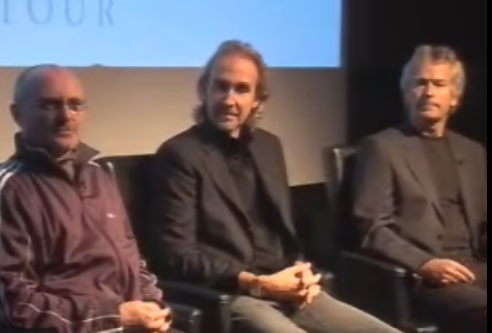
It looks like Genesis is going back out on the road. Phil, Mike, and Tony will be doing 20 shows in Europe and 20 in the US for the "Turn It On Again" tour of 2007. Originally, the five members from the classic '70s lineup met to see if they could schedule a set of shows of "The Lamb Lies Down on Broadway", but Peter Gabriel declined due to scheduling conflicts. With Peter out, it didn't make sense to include Steve Hackett as the four member version of Genesis was only a tiny slice out of their history. You can view their news conference where they discuss all of this from this shiny link.


With just 20 shows in the US, I don't have my hopes up for a local appearance.

Wednesday, November 08, 2006

Sometimes there is a free lunch


I had a nice little surprise in my email yesterday. It was a gift certificate from VSoft Technologies for a one free license for Automise. Evidently I received it because I own a license for FinalBuilder, a fantastic tool for automating product builds.

With FinalBuilder, I can create a new build of one our applications from source control, through compiling, to building the installers, to sending out email to all interested parties that a new build is out.

Automise is basically FinalBuilder, but without the compiler specific tools. If you have a batch process that uses a motley collection of batch files and command line tools, then Automise will make your life simpler.