I saw this on secretGreek today:
intellisense
||
\/
code >>> compile >>>> run >>> success ;-)
/\ || ||
^^ \/ \/
^^ errors errors
^^ \\ //
^^ \\ //
^^ ||
\\ \/
\<<<<<<< cut N paste
I have days where this is my programming model.
I saw this on secretGreek today:
intellisense
||
\/
code >>> compile >>>> run >>> success ;-)
/\ || ||
^^ \/ \/
^^ errors errors
^^ \\ //
^^ \\ //
^^ ||
\\ \/
\<<<<<<< cut N paste
I have days where this is my programming model.
I was debugging some code in VS 2005 when I noticed that I could no longer find "Step Into" on the debug menu. I was already used to the keyboard short cut of F11, but I was wondering why it was no longer on the menu. After some googling, I found a post from Paul Litwin's blog that explained how to fix it. Basicly, the IDE thinks that you just don't want to see that menu item and you just need to reset your profile. Here are the steps that Paul listed on his blog:
OK, I couldn't resist the last one. The $64,000 question is why this happened in the first place. When Paul posted his blog entry, VS 2005 was still new and shiny and the thought was that a prior installation of VS 2005 (beta?) had some how screwed up the settings. That didn't match my setup, I avoided the VS 2005 beta like the plague. I do have VS 2003 installed, that may have confused VS 2005. I also installed SQL Server 2005 before VS 2005, that too could confuse VS 2005.
Tech Tags: Step+Into Visual+Studio+2005 VS+2005 Underpants+Gnomes
 While skimming Boing Boing, I came across a link to some MP3s by Takeshi Terauchi. These files come courtesy of WFMU's Beware of the Blog. Takeshi Terauchi plays surf guitar music the old schol way, these MP3s were from recordings that are four decades old. They sound the Ventures with backed by a traditional Chinese opera (in a good way). WFMU has two complete albums, This is Terauchi Bushi, and Let's Go Classics.
Let's Go Classics is a surf guitar interpretation of traditional classical pieces like Blue Daube Waltz and the theme from Swan Lake. Very different.
Takeshi Terauchi started out as a sideman in Country/Western band, Jimmy Tokita & the Mountain Playboys. In 1962, Terauchi formed his first Eliki (Japanese slang for Electric) band, the Bluejeans, becoming Japan's first Surf band. In '66, Terauchi quit the Bluejeans and formed the Bunnys, the group behind the two albums on WFMU.
I'm on my third E-ZPass tag. The battery in the first one died after about 5 years. I have had the second one for another 5 years. This time, the E-ZPass people sent me a new one before the current one died.
They did it the right way. The new tag came in a small envelope with a letter and a return envelope. The return envelope was for the old tag so it could be sent back. It was a pre-paid envelope, a nice touch. The letter explained that the new tag had to be sent back, or I would be charged for it's replacement cost.
They clearly labeled the serial number of the old tag and of the new one. I have two tags in use, I had to check each car to grab the right one.
The replacement tag had a eaisy to peel off sticker with the following text: THIS IS YOUR REPLACEMENT TAG. Seems kinds of obvious, but if you are fooling around in your garage with the tags, that makes it easy not to mix up the old tag with the new one.
They could have mentioned which car the tag was for. The only way to tell was by the serial number on the front of tag. I could read it just fine, but it's in small print and that's not too friendly for AARP crowd. That would be the only thing I would have changed with how they handle replacements.
More companies should study how the E-ZPass program is run. The hardware just works, no fuss or muss. We recentl;y drove from Albany NY, to Corolla, NC and just about every toll bridge and road accepted the E-ZPass. The only exception was the Chesapeake Bay Bridge-Tunnel, and they are in the process of implementing an electronic toll collection system (E-ZPass).
I came across this blog post by Robert Scoble while checking something for a GPS data collector that I writing, it has a useful data point to file in the back of the mind. It has nothing to do with GPS data collection or even what I was googling for, but it explains a very good reason why you won’t see Linux on corporate desktops for the conceivable future.
I can sum it up for you with one sentence: Linux fonts and their technology are no match to Windows and the Mac.
I'm not bashing Linux, I have a few things that run on it at home. Not paying the Microsoft tax makes perfect sense for devices using embedded OS's. I love my TiVo and the fact that it uses an OS that doesn't blue screen. My $70 router/access point is running a pretty cool 3rd party firmware that could only be done if it was using Linux.
But on the desktop, I want a desktop that easy on the eyes. The quality of the fonts and how they are displayed are a huge part of that. Microsoft recognizes that and they spend a lot of time and money on fonts. Consolas is a very nice typeface for pounding out code. It's not everyone's cup of tea, but I like it.
 Dave Zatz uploaded to YouTube a file that's relatively hidden on TiVo's web site which details the mysterious orgins of the TiVo device. Tune and watch "Project Bluemoon".
You can also download the file as an .mp4 video directly from TiVo's web site (50 mb) from www.tivo.com/bluemoon.
There looks like there are some subliminal text message in the video, I couldn't navigate YouTube's controls with enough precision to get the frames with the text. It was a more subtle effect than the blipverts used in some GE commercials than ran back in May.
I've been drooling over reading the various articles and blog postings over the soon to be released TiVo Series 3.
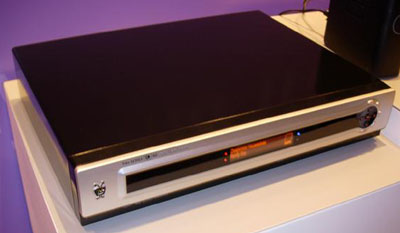
It has the stuff I want: Ethernet support built in, dual tuners, cablecard, High Def, big honking hard drive (plus external SATA port). The rumored list price is $795. That's a lot of shekels. I have two Series 2 units and $800 is too much for my pocket. Maybe next year if the prices drop...
I read a rumor that they are finally addiing WPA support for their 802.11g adapter. I don't know how accurate that rumour is, TiVo has been planning on supporting WPA for nearly two years.
It's stunning that they have gone so long without it WPA. When I first bought my TiVos, I had them on the home network using a wireless connection. I did it a little differently than most people. TiVo supports a limited range of USB connected wireless network adapters. TiVo supports WEP, but not WPA.
WEP is fairly trivial to crack, while WPA is pretty secure. Our neighborhood is pretty noisy on the 2.4ghz spectrum, everybody and their mother has a wireless router/access point. I had set up the wireless part of my home network to be 802.11g with WPA security. TiVo's wireless solution was not going to work.
There is more than one way to proivde wireless ethernet. I picked up a couple of SMC 2870W wireless bridges. A wireless bridge converts an Ethernet to 802.11 (a/b/g/n) signal. It works transparently to the Ethernet equipped device. That device thinks it's on a wired network and there are no drivers to install. The 2870W supports WPA right out of the box. The radio on the 2870W is lot more powerful than the run of the mill USB wireless adapters, it's like having mini access points on each machine.
With the TiVo, I use a cheap Linksys USB to Ethernet adapter and connect that adapter to the bridge. The TiVo thinlks it's on a wireless network and everyone is happy. There is an additional performance benefit by offloading the 802.11g processing from the TiVo to the 2870W. The bottleneck becomes the 11 mb/s speed of the USB connection. The TiVO CPU is not the fastest in the world. Its roughly equivalent to Pentium 100, no need to have it tackle 802.11 processing if it doesn't have to. That's probably the reason it didn't support WPA, just not enough horse power under the hood.
The Linksys/SMC combination worked very well, I never had any problems. I had more problems using a Linksys 802.11g adapter on Windows XP box on the same network and in the same room as one of the TiVos.
I ended up running CAT5e cable through the house when I swtched to FiOS and now the TiVos are wired to the network. If you can do that, life is much easier. With each TiVo directly on the network, I can transfer shows between the TiVos in real time. I'm still hobbled by the Series 2 USB speed (or lack thereof), the Series built in Ethernet adapter would be cool to have.
Main
| Solid orange | Charging, OK to disconnect. |
| Blinking orange | Mounted, do not disconnect. |
| Solid green | Connected to charger: fully charged, OK to disconnect. Not connected: play. Light will turn off after two seconds. |
| Blinking green | Paused: light will turn off after one minute. |
| Solid orange when you press a button | Hold is on. To turn it off, hold the Play/Pause button for three seconds. |
| Solid green when you press a button | Normal operation of that button. The light stays on as long as you press the button. |
| Blinking green and orange | You're trying to play a song, but the shuffle is empty. |
Battery Status (when pressed)
| Green | Good charge. |
| Amber | Low charge. |
| Red | Very low charge. |
| Off | No charge. |
courtesy of Craig A. Finseth
One of clients went to run some of our applications on their Windows Server 2003 SP1 box and it wasn't very pretty. They got the error message:
Not a very helpful message. It happens when we access an ADO object within our code. We couldn't duplicate the problem on our W2K3 SP1 boxes. Some searches through Google seem to point the figure at a corrupted MDAC stack with SP1. When our client rolled SP1 back, the problem went away. Microsoft seems to be aware of a similiar problem as they have a KB article, 889114, that describes a similiar issue in Msdart.dll, but not with W2K3. I have also seen references to another article, 892500, but that one refers to DCOM permissions. I'm not sure if that one is relevant.
The question now is how to resolve this issue. How many ways can SP1 be installed on Windows Server 2003? Our boxes got SP1 through Windows Update and they have the right version of Msdat.dll.
During initial e-Link web service development, I played around with lowering the priority of a background processing thread. It didn't need to run in real time and having the service handling client requests was more important. For a background housekeeping thread, I lowered it's priority to BelowNormal.
Well that didn't work quite the way I expected it. That thread never ran, or it ran so seldom that it was effectively useless. So I removed the calls to lowering the thread priority and life was good again. I chalked it up to one of those thread things not to touch and moved on to other tasks.
Today, I saw a posting on the Coding Horror that explained why you should never mess with thread prioirities. If you have a thread running at a lower priority and it enters a sleep state, it may never wake up if another thread with a higher priority continues to run. That's an oversimplification, the actual details are described better here by Joe Duffy.
The moral of today's story is "Set up your threads at normal priority and let the operating system deal with scheduling them"
I was banging my head against the wall with an odd stream reading problem. I was making a web service call as straight http, no SOAP, when I hit a snag reading the response back. I was making the request with a HttpWebRequest object and getting the HttpWebResponse response back by calling the HttpWebResponse GetResponse() method. From the response object, I was using GetResponseStream() to get at the content. The data coming back was of variable size. You would get a fixed size header block, plus a number of fixed sized data entries. The header block had a field to say how many data blocks there would be.
Naively, I thought I could just use a BinaryReader on the data stream and read x number of bytes in for the header block. The I would parse that header to the get number of data blocks and then call Read() for that number of data blocks. Let's say that the header block was 64 bytes in size and the data blocks were 32 bytes. I had logic like the following:
HttpWebRequest req = (HttpWebRequest)WebRequest.Create(uri);byte[] buff = new byte[Marshal.SizeOf(typeof(MyHeader))];
c = br.Read(buff, 0, 64);
GCHandle handle = GCHandle.Alloc(buff, GCHandleType.Pinned);
MyHeader header = (MyHeader)Marshal.PtrToStructure(handle.AddrOfPinnedObject(), typeof(MyHeader));
handle.Free();
LogEntry MyLogEntry;
for (int i=0; i < MyHeader.EntryCount; i++)
{
buff = new byte[Marshal.SizeOf(typeof(LogEntry))];
c = br.Read(buff, 0, 32);
if (c == 32)
{
handle = GCHandle.Alloc(buff, GCHandleType.Pinned);
LogEntry = (LogEntry)Marshal.PtrToStructure(handle.AddrOfPinnedObject(), typeof(LogEntry));
handle.Free();
}
}
The problem was that c was sometimes less than 32. My bytes were disappearing. I did some quick sanity check code like this:
c = br.Read(buff, 0, 8192);
TotalBytes = c;
When I ran that, TotalBytes had the expected number. What was I missing? A little bit of googling found this bit of extremely helpful information from a guy named Jon. I was reading while data was still coming into the stream. The Read method is going to return before all of the data has been written to the source stream, I had to read the stream into a holding array, by reading it as chunks, until there were no more bytes. Then I could read the data from the array. This was so obvious, I can't believe I missed it. The ReadFully() method that Jon supplied worked quite well.
In case you were wondering about the GCHandle stuff, that was needed to marshall C style structures into C# structures. Getting that bit of code to work right is another story....
I just installed the Beta 2 of Vista on one of my dev boxes. It used to be my primary development box until I got a bright shiny new one last year. About two weeks ago, the hard drive had a massive failure (it needs to be defraggled at this point) and I needed to rebuild the box. Since we had the Vista DVD, I figured why not. We set it up as a dual boot, with XP as the "other" OS.
After a couple of days of use, I've come the this conclusion. Vista is a pig. It's slow to boot and slow to run. It's running on an older box, P4 1.7ghz with 1GB of RAM, but that box is fast enough to run XP without any issues. It's slow enough that I am not going to use it as a day to day OS. I'll run XP as the primary OS and I'll manually boot into Vista when needed. The performance issues come with the beta tag, that's all and good. I just can't use it. It felt like OS/2 on a 386.
The fun part was trying to figure out how to get XP back as the default OS. The new Vista Boot Loader is a strange and wonderful beast, but it's not your father's boot.ini file. With boot.ini, it's a trivial process to set the default OS. Vista requires you to use a new command line tool named bcdedit.exe. With bcdedit, you can specify the default OS, by using the /default parameter and the GUID of the OS to run.
The GUID of the OS? Where the frack do I get the GUID of the OS? If you run BCDEDIT /enum all, you get a listing of everything BCDEDIT knows how to load and the includes the GUID. Except for my XP, which didn't get one. Apparently that's a magic number, if you run bcdedit /default {466f5a88-0af2-4f76-9038-095b170dc21c}, the legacy OS becomes the default.
Since I'm using the Vista Boot Loader, I'll need to remember to restore XP's boot loader before I rip out this Vista Beta for next one. In the Vista section of Tech-Recipes, they have helpful information on how to do that. What you need to do is the following:
Lifehacker has some tips on how to setup the dual boot here.
After a couple of weeks of vacation, I came back to the office to find my old development book DOA. It was worse than a Blue Screen, it was a black screen with Read/Write error message. My C: partition was filled with CRC errors. I could copy some files off it, but most were toast. A second parition on the same drive reported no errors, so I don't think it was a drive failure. We did have a brown out while I was away, and that box only had a surge protector to save it. Which it didn't.
I was planning on on installing the Vista Beta 2 in a VMware session on my main development box, but I think it will go on the old box. I have to reinstall the OS anyways, why not go with the beta. It's not like I have anything to lose at this point.
This post and the one before it was created with Windows Live Writer (Beta). It's a pretty cool blog entry tool from Microsoft. What is really nice about it is that it reads your blog setup and you can edit the posts in the look and feel of your actual blog. It just works. It didn't display the map below, but it showed where it would be.
Another cool feature is that you can edit previous posted entries and it replaces the old post with the new post. This is my 3rd attempt on this post.
We spent a week down on the Outer Banks in North Carolina. We have been going on and off down there for the last ten years and I like it alot. This year, we stayed in Pine Island, on the southern end of Corolla. I played a bit with Wikimapia and got this map of where we stayed:
The house in the lower left corner is where we stayed. I tell you the name, but I want to rent it next year...
One of the other developers that I work with had a question about inserting some date values into a SQL Server database. The code in question is doing a batch insert and it was implemented as a series of INSERT statements and they get executed in large batches. He was having some difficulty in getting the right values for the dates. He was formatting the INSERT statement with the datetime values being formatted as numeric values. The end result was that the dates were off by two days. It was easy to fix and is yet another example of a leaky abstraction can bite you in the ass.
Dates are not numbers. You have to consider them to be an intrinsic date type, even if the environment handles them internally as floating point numbers. It's easy to get into the habit of adding 1.0 to datetime variable to increment the time by one day. SQL Server will happily let you do so, and so do many programming languages. Oddly enough, Sybase Adaptive Server Anywhere wont let you treat datetime values as numbers, they force you to do it the right way.
The problem is how each environment anchors that numeric value to the actual calendar. What day is day 0? It depends on what created that value. For SQL Server, the number 0 corresponds to 1900-01-01 00:00:00. In the Delphi programming environment that we do a lot of work in, 0 works out to be 1899-12-30 00:00 (a Saturday for those keeping score). If you pass in a datetime as numeric, when you query it back out of SQL Server, it's going to two days ahead of from your original date.
The 1899 date was define by Microsoft when they defined their OLE Automation data types. The .NET runtime uses 0001-01-01 as it's starting point. Those are not the only ways datetime can be encoded. Raymond Chen did a decent round up on his blog.
The way we usually pass in datetime variables in non-parameterized INSERT statements is to encode the datetime variable as a string in the standard SQL-92 format (yyyy-mm-dd hh:mm:ss).
FreeAndNil(Fredo);
procedure FreeAndNil(var Obj);
var
  Temp: TObject;
begin
  Temp := TObject(Obj);
  Pointer(Obj) := nil;
  Temp.Free;
end;
PsList 1.26 - Process Information Lister
Copyright (C) 1999-2004 Mark Russinovich
Sysinternals - www.sysinternals.com

Process memory detail for Kremvax:

Name                Pid      VM      WS    Priv Priv Pk   Faults   NonP Page
firefox            3936  108952   41380   32748   36452   140201      8   54
pslist -m firefox | find "firefox" >>c:\logs\memuse.txtThat gave me the last line in a file. But I still needed the time stamp. I thought about going through some script file sleight of hand with ECHO and DATE, but this is the Windows Server 2003 CMD.EXE. It doesn't have that skill set. I could do with some 3rd party shells, but the goal is something I can deploy on a remote site without anyone having to pay for a tool or go through the hassle of installing something like Power Shell.
program dtEcho;

{$APPTYPE CONSOLE}

uses
  SysUtils;

var
  s: string;
begin
  ReadLn(s);
  WriteLn('[' + FormatDateTime('yyyy-mm-dd hh:mm', Now) + '] ' + s);
end.
pslist -m firefox | find "firefox" | dtecho >>c:\logs\memuse.txt
[2006-07-28 23:14] firefox 3936 536904 61324 51244 57384 445377 90 249The output only goes down to the minute, I'm tracking the memory usage every 10 minutes, I didn't need to make the timestamp that granular. If I needed it, I just need to make a slight change the dtEcho source code and it will print the seconds.
[2006-07-28 23:15] firefox 3936 538176 60844 50764 57384 449193 91 249
[2006-07-28 23:16] firefox 3936 538212 60620 50528 57384 455935 91 249
CREATE TABLE [MyLog](
       [RecordID] [int] IDENTITY(1,1) NOT NULL,
       [LogTimeStamp] [datetime] NOT NULL,
       [Duration] [decimal](12, 4) NOT NULL,
       [SessionID] [varchar](40) NOT NULL,
       [IP] [varchar](24) NOT NULL,
       [Request] [varchar](80) NULL,
       [Response] [varchar](80) NULL,
       [Error] [varchar](255) NULL,
       [Description] [varchar](80) NULL,
 CONSTRAINT [PK_MyLog] PRIMARY KEY CLUSTERED
(
       [RecordID] ASC
) ON [PRIMARY]
) ON [PRIMARY]
GO
CREATE NONCLUSTERED INDEX [SK_MyLog_LogTimeStamp] ON MyLog
(
       [LogTimeStamp] ASC
) ON [PRIMARY]
DELETE MyLog WHERE DATEDIFF(DAY, LogTimeStamp, GETDATE()) > 30DECLARE @PurgeDate smalldatetime
SELECT @PurgeDate = DATEADD(DAY, -30, GETDATE())
DELETE MyLog WHERE LogTimeStamp < @PurgeDateOverheard at work today.
"It's Wise, so I really don't ask questions. I just work around it." — Sam Tesla, 7/12/2006
If you've worked with the Wise for Windows Installer, you'll understand...
[Joe White's Blog]


