Tuesday, June 27, 2006

What do the following have in common?

What do the following have in common?

The answer is not this.  These are the previously announced features of Microsoft Vista that have been dropped out of the product over the last couple of years.  Here’s a link to a good article with the gory details…

At the rate features are being being axed, at what point does Vista come XP SP3? It’s becoming XP with tighter DRM, and who wants more of that?  Of all of the stuff that’s been yanked, WinFS was the one that I really wanted.  I really hoped that MS could have pulled it off.

On the other hand, it just sounded too complicated to actaully pull off.  Having your file system be dependant on SQL Server requires a lot more under the hood with that much more resources required.  To a certain extent, the desktop search tools that came out in the last two years made the need for WinFS less important.

Tomato funeral

I saw a reference to “tomato funeral” on a .Net developer’s blog.  I had to click through the link and ended up somewhere deep in the bowels of Wil Wheaton’s blog….

My friends and I have, in the past, enjoyed playing a game we affectionaly call "tomato funeral". Often when we find ourselves in close but temporary proximity to a stranger or group of strangers (like being in an elevator) one of us will start the game by turning to the other and asking:

"So then what happened?"

At this point it's the goal of the other person to come up with the most nonsensical but still plausible conclusion to a conversation that will presumably leave the strangers wondering for the rest of the day what possible situation could have led up to that phrase. The game is named after one of the earliest successes:

"Oh, well, she went to the funeral, but, well, you know, I doubt she'll ever eat tomatos again"

Points are awarded for creativity and quickness of response.
http://www.wilwheaton.net/mt/archives/001827.php#c109100


Tuesday, June 13, 2006

Fun with scripted load tests

We are getting ready to do some load tests and it's time to pick some tools.  The app that we want to test is a client/server app with buckets of processing going on the client side.  Most c/s load test tools just emulate the traffic that goes on between the client and the server.  For our app, that wont work, the load occurs on both the client and the app and we have to drive the app.  This means one instance of the app per PC.  We have tried multiple instances of the app on the desktop or through multiple terminal service sessions, but that just didn't work.  We tried that a couple of years ago at at the Microsoft testing facility in Waltham, MA, but it only would work as one app per machine.

So we will just do that here in the office.  Some night, after everyone goes home, we'll log into each desktop with a special login (limited access) and run our tests.  We are evaluating HighTest Plus, from Vermont Creative Software.  It's an automated software testing tool that allows you to record and playback keyboard/mouse actions.  What we want to do is to setup a repository of scripts and have a set of PCs run the scripts.  The fun part is how to start each testing session without having to walk over to each machine and login and then run the script.

I first looked into somehow getting each machine to login into the testing account.  There's no easy way to remotely script this.  For security reasons, you have to use the keyboard and/or mouse with the login dialog, you can't bypass that with a script invoked from another machine.   We didn't want to install any remote access software like VNC or pcAnywhere.  It would cost too much and we didn't want to leave anything running on the machines during business hours.  That leaves Remote Desktop.  You can script the mstsc.exe client so that you can feed in the login infomation.  So we started with that.

We wanted to start the remote desktop sessions and then disconnect from them, with the sessions running.  The reason for this was that the machine controlling the tests would end up with 10 to 40 remote desktop sessions and there could be a resource problem.  We tried using Sysinternal.com's excellant psxec utility to remotely invoke the HighTest executable.  No matter hoiw we sliced it, it would fail with msg hook error message.    This meant that we had to invoke HighTest from a process running on the remote pc.  After banging a few things around, I created a batch file on the remote pc to launch the HighTest executable and added the the "Scheduled Tasks" list.  That worked, so I disabled the task so it wouldn't get launched by accident.  The schtasks.exe can be used to run scheduled jobs, even from other machines.  Provided that the machine has an open desktop and is not a disconnected session.  Disconnected sessions do not receive keyboard or mouse input, not even simulated input from HightTest.

We have once more trick up our sleeves.  The remote desktop client (mstsc) can be configured to run a program after you are connected.  If you have the "Remote Desktop Connection" dialog open, click on the "Programs" tab and you will be able to configure the program that you want to run.  We we will do is to have it run a batch file.  That batch file will run the HighTest tool, do any cleanup, and then logout.  And that's how we plan on running our load tests.

[Edited on 6/14/06]
Scratch the running of programs from the "Remote Desktop Connection" dialog.  That only works if you are connected to a Terminal Server.  You get bupkis if you use that option with Windows XP.  We are back to looking at using schtasks.exe after starting the remote session with Remote Desktop.

Tuesday, June 06, 2006

Self installing services in .NET

I have some service applications that I deploy with Wise for Windows. These particular services are .NET assemblies. The usual way of registering the .NET assembly as a service is to use the installutil.exe that comes with the .NET Framework. Wise made it easy to register the assemblies by adding a checkbox in the file properties for self installation. Behind the scenes, Wise must be calling installutil, because it fails when you have multiple versions of the .NET Framework installed. Installutil is not compatible across Frameworks. You can’t install a 1.1 assembly with the 2.0 installutil, and vice versa.

Wise does not let you specify which version of the Framework is being used by a particuliar assembly. It should be able to tell through Reflection, but it doesn’t. This means I can’t specify the correct installutil to use for my services. This is not good and causes my install projects to go down in flames. I really can’t wait for Wise to fix this.

I could call installutil directly, but that means putting all sorts of fugly code into the install project to correctly locate the appropriate version of installutil. And that code would probably break the minute Microsoft updates the .NET Framework. So we move to Plan B, self-installing services. You would think that this would be a simple walk through the MSDN garden, but their code examples assume that that task is being handled manually via installutil or through a Windows Installer project.

After a bit of Googling, I found a reference to an undocumented method call, InstallHelper, in the System.Configuration.Install.ManagedInstallerClass class. By using this method, I can install or uninstall the service from the command line.

I augmented the Main() function in the service class to look like this:


static void Main(string[] args)

{

if (args.Length > 0)

{

if (args[0] == "/i")

{

System.Configuration.Install.ManagedInstallerClass.InstallHelper(new string[] { Assembly.GetExecutingAssembly().Location });

}

else if (args[0] == "/u")

{

System.Configuration.Install.ManagedInstallerClass.InstallHelper(new string[] { "/u", Assembly.GetExecutingAssembly().Location });

}

else if (args[0] == "/d")

{

CollectorService MyService = new CollectorService();

MyService.OnStart(null);

System.Threading.Thread.Sleep(System.Threading.Timeout.Infinite);

}

}

else

{

System.ServiceProcess.ServiceBase[] ServicesToRun;

ServicesToRun = new System.ServiceProcess.ServiceBase[] { new CollectorService() };

System.ServiceProcess.ServiceBase.Run(ServicesToRun);

}

}


The “/d” part hasn’t been tested yet. That should allow me to debug the service as an application from within the Visual Studio IDE. As much as I dislike having to use an undocumented class, I’m not going to lose any sleep over it. Microsoft obsoleted documented functions going from Visual Studio 2003 to 2005, I’m not going to worry about one method.

[Edited on 6/8/06]
I updated the block of code for the "/d" part. I needed a timeout to keep the service running, otherwise it just runs through the startup and then exits. You can make it fancier, I just use that code for testing from within the IDE and I can break out of the service when I am done testing it.

[Edited on 7/20/06]
After a few go arounds with Wise Technical Support, I sent them a sample installer project that easily duplicate this bug and they did confirm that it was a problem with their current product. There is also a similiar problem where you can't install .NET 1.1 services under similiar circumstances. Their fix for my problem will fix the .NET 1.1 service problem too. According to the email that I had received, this is tentatively scheduled for the next release. That would probably be the version 7.0 release. In the meantime, I'll stick with my work around.

[Edited on 1/27/08]
The MyService object in the above code is an instance of a System.ServiceProcess.ServiceBase descendant class that I created in my code.  The descendant class opens up access to the protecteded OnStart() method.  I had created a descendant to ServiceBase and had assumed that was the standard pattern.  I should have been more clear about that part.  This is one of the many reasons why I abandoned Wise for InstallAware.

Tuesday, May 30, 2006

Leaky Abstractions in Wise for Windows

I had just reported a bug with the Wise for Windows Installer (it can't call the Install method on a service compiled under the .NET Framework 2.0) and I checked the Altiris support forum to see if there were any other surprises. One of the senior forum members reported something interesting with the MSI scripting. He had a block of code with the following logic:

If NOT Installed AND NOT ARG
..Do thing1
..Do thing2
..Do thing3
..Do thing4
..Do thing5
End If


At runtime, the first three actions inside the block were executed, but not the last two. This was a tricky one to figure out. Wise shows the actions as if they are running in a script, with an actual IF/END IF block. MSI technology is database driven. Instead of a script, you have each action as a row in a table, with the same IF condition defined for each action. Similiar in behavior to a script, but the condition is evaluated for each row. The thing3 action was changing the value of ARG, and when the condition was reevaluated for actions thing4 and thing5, the result of the IF condition had changed. This is another example of how Leaky Abstractions can bite you in the ass.

Programmers are used to seeing procedural code in a script. Wise does a pretty good job of abstracting out database rules to pseudo scripts, but it's not a perfect abstraction. Unless you ran the installer through the debugger, and examine conditions at thing 3 and then at thing4, you would never see what was going on.

Friday, May 26, 2006

Samsung bans its own product

Samsung has a cell phone with a 8gb hard drive (form musinc playing) and they have banned it from their own premises. They don't allow portable memory devices that can be used to smuggle out confidential information. Gizmode has the article here. It's kind of funny, in an ironic sort of way.

Update: Techdirt has a better article here.

Visual Studio .NET 2005 Keyboard Shortcuts

Jeff Atwood has a great list of keyboard shortcuts for Visual Studio 2005.

Rants against the machine: Are stored procedures inherently evil?

Jeremy MIller has a good rant against the use of stored procedures. He thinks prefers to keep his code in the application and use T-SQL sparingly. HIs view is that sprocs are harder to test and harder to understand. There's a logical disconnect when you business logic is split between the application and the database.

I sort of agree with his viewpoint, but not completely. I think that using sprocs for most CRUD applications is a waste of time. Adhoc SQL is usually sufficient for that task. But there are plenty of times where a sproc is pretty handy. Our applications are a mixture of Win32 Delphi and C# and work in the same database space. Having some of the business logic at the database level is better reuse of shared code than duplicated code across development platforms.

But I do agree with Jeremy about the additional burdens that come with sprocs. You have to manage the versions. You have the additional burder of having multiple versions of the sproc if you support multiple database vendors (we do SQL Server and Sybase SQL Anywhere). Your programmers need to know more about SQL than "SELECT * FROM SomeTable".

His complaint about the sprocs being out of sync with the code was a non-starter for me. We version our database schema changes with our application code. If the database version isn't in sync with the application version, we force the user to update one or the other. I implemented a simple way to send out database changes with a point and click interface, each new version of our applications is bundled with the database update file that brings the database up to the current application version.

There are performance considerations to consider as well. Once you get past the CRUD, you can get your money out of SQL Server with well designed sprocs. I was able to get 10x improvement recently in one part of a service that I written be replacing a hideously over-complicated adhoc SQL statement with sproc that produced the same results. That sproc split the SELECT statement into multiple statements that stored the individual results into table variables and then combined the individual results into a single result that matched the output of the original SQL statement. Your mileage may vary.

I think we are seeing the swinging of the pendulum from everything must be in a sproc to "sprocs bad, code good". As with most things, I think there's some point in between that has your comfort zone. I'm quite content letting the database layer du jour (ADO/ADO.NET/Code generator) handle the CRUD tasks. When I feel the need for speed, I have no qualms against using "CREATE PROCEDURE".

Thursday, May 25, 2006

DIY Mosquite Trap

Image Hosted by ImageShack.us
Here's a home made misquito trap.  The translated instructions can be read here.

Best Buy prank


What happens when 80 people wearing blue polo shirts walk into a Best Buy?

Why it must be a new mission from Improv Everywhere.

Delphi 2006 quirks

As I move over to Delphi 2006, I came across an odd new behavior.  In Delphi 7 and prior versions, it was very easy to view/edit the project (*.dpr) file.  Usually you let Delphi manage that file, but sometimes you want to edit it directly.    The "View Unit" button (or CTRL-F12) would include the .dpr file in the list of source code units that belonged to the project.  You would select that file and it would open up inside the Delphi IDE.

In Delphi 2006, it doesn't work that way.  The only way you can get access to the .dpr file is to select "View Source" from the "Project" menu.  I wonder why they made that change in the behavior.  I don't have to directly edit the .dpr files that often, but there are times where I do need to do so.

The other oddity is the lack of the support for the SCC API fo using your preference for source control.  It's 2006 people, there's no reason why you can't pick your own SCC provider for use from within the Delphi IDE.  I have no interest in the StarTeam source control bundled with Delphi.  We dumped VSS for SourceGear's Vault and we have been very pleased it.  And I want to use if within Delphi like I can with Visual Studio.  While there's no mysterious force preventing me from running the Vault IDE along side the Delphi IDE, it's a concentration killer to leave the coding IDE just to check out the file I need to work on.  On small projects that I am the sole owner, I'll just check all of the code out, but on the team projects, you just don't do that.  VS spoiled me by prompting me to check a file out as soon as I started editing it.

I've been playing with the 30 trial of EPocalipse's SourceConnXion 3 for that last few days.  It provides source control integration for Delphi 2005/2006 and so far, so good.   I've added it to the list things for the boss to buy as part of our migration to Delphi 2006.

Thursday, May 18, 2006

Using Cache in Your WinForms Applications

Here's a decent article about using ASP.NET cache (System.Web.Caching.Cache) in WinForms applications (or services).  This would be handy in service application, I can't see how much use it would be for an actual WinForms application.  Combined with the SqlCacheDependency class and SQL Server 2005, then you can cache frequently used rowsets and let the .NET invalidate them when the source data is updated on the server. It should be more efficient than periodically pinging the server for data changes.  It does require Windows 2000 or later.  That's not a deal breaker for a service app, but it eliminates Windows 9X for a WinForms app.

Monday, May 15, 2006

Playing with Firefox again

As much as I am an Opera bigot, I still roll out Firefox from time to time. This is one of those times. There are enough web sites that still do not work with Opera, that I m forced to use on of the more mainstream browsers. I limit my usage to IE to Hotmail and Outlook Web Edition. As much as I prefer the raw speed advantage of Opera, FireFox does have more cool toys for it. I added the Performancing for FireFox extension and I'm using it right now to post this message. It seems a quick way to toss up a quick blog posting without having to run a stand-alone blogging tool, or worse, Blogger's online tool.


Technorati Tags: , ,

Friday, May 12, 2006

Tao of the Windows Installer

There are some really good Windows Installer guidelines up on the Windows Installer Team BlogPart 1 went up yesterday and Part 2 went up today.  Most the rules I follow already, due to constant beating of the forehead against the wall experience that I call working with Windows Installer, but it was help to see the rest of them.  I listed them below, with my own comments.  Visit the links for Part 1 and Part 2 for the full text behind each rule.

Rule 1: Learn the Windows Installer Technology

This is key.  I picked up a lot from Wise’s support forums.  A really good book is The Definitive Guide to Windows Installer by Phil Wilson (ISBN: 1590592972)

Rule 2: Know Your Way Around the Installer SDK

I’m just starting to get under the hood with the SDK.  I wrote a console app in Delphi that allowed me to upgrade ProductCode and Package code of .msi/.wsi files.  It was part of a plan to heav each build of our application be able to upgrade from each previous build.  Other considerations led to me to shelf that plan, but it was interesting working in the SDK

Rule 3: Use the “Windows Logo” Program as a Basis For Good Practices
Rule 4: Always Use the Latest Version of the Installer

Both are common sense.

Rule 5: Build Setup Into Your Application Development from the Start

On my last project, I fought constantly with the project lead over this.  Having done several installer projects in the past, I knew what I was getting into and planned for the installers from the start.  This made life much easier.

Rule 6: Get to Know ORCA

Simply the best tool for diagnosing problems with a .msi file.  You can get from the Windows Server Software Development Kit.  The current version is the “Windows® Server 2003 R2 Platform SDK”.

Rule 7: Work On a Copy

More common sense.

Rule 8: Never Cancel a Package Build Before it Finishes

I never knew about that one.  With installer tool that I’m using (Wise), I don’t see that is being a real issue.

Rule 9: Use a Clean System for Repackaging
Rule 10: Do Not Repackage Microsoft Updates
Rule 11: Do Not Repackage MSI-Based Applications

Still more common sense.

Rule 12: Modify Vendor Packages Using Transforms

I may be doing this in the near future.  I haven’t had to do any package transforms, but I understand the basic concepts.

Rule 13: Be careful with Installer GUIDS

It took a while to sink into my head over the Gang of Three GUIDS, but it’s in my firmware now.

Rule 14: Use Consistent Package Naming Conventions
Rule 15: Do Not Try to Replace Protected System Files

Common sense again

Rule 16: Follow Component Rules

I need to study this more.

Rule 17: Understand File Versioning Rules

One of my pet peeves with Windows Installer.  Why does it ignore the last number of a version number?  If it could use all four parts of the version number, I could have my build to build upgrades and there would be much rejoicing in the land of Queue-ay.

Rule 18: Improve Performance by Limiting System Restore During Setup
Rule 19: Avoid Using the SelfReg Table

Good tips

Rule 20: Avoid Nested Installs

Having one .msi calling another .msi is something I seriously plan on avoiding.  Just follow Spengler’s warning and don’t cross the streams.

Rule 21: Avoid Using Configuration Data You Don’t Own
Rule 22: Differentiate Between User and Application Data
Rule 23: Don’t Use Resources You are Installing

Still more common sense.

Rule 24: Use Cabinet Files to Reduce Package Sizes

I need to look into that more.  I wonder how that would play with installers for web sites.  I could toss all of the .ascx files into a .cab file and the assemblys as separate files.  For Win32 executables, I usually pre-compress them using UPX as part of the build process, putting them into .cab files would gain nothing.

Rule 25: Follow Custom Action Rules

Some good tips.  I don’t use many custom actions, but it’s good know what not to do

Rule 26: Consider Storing User-specific Data in a File

This an interesting one.  Our .NET apps follow this methodology, but our Win32 apps use the registry for most user specific settings.   Something to consider going forward.

Rule 27: Consider Maintaining Setup in Text File Format

I would to be able to do this with Wise’s .wsi files.  The problem is that the .wsi is actually a .msi file, and I have yet to see a tool that will reliably convert a .wsi/.msi file to text and back again. I tried MSIDIFF, but something always gets mangled and when you convert a file from one to the other and back again, you don’t always get the same file back.  That’s not a good thing.

Rule 28: Think about Localisation

Something I don’t have to deal with…

Rule 29: Follow the Assembly Rules

Wise does a good job with this, I usually don’t have to worry about assemblies.

Tags:

Saturday, April 22, 2006

Spring cleaning

While cleaning out the home office (E-Bay, here I come), I came across a souvenir from Hong Kong. It's a shopping bag from Watsons, I have held on to it for nearly three years as a reminder of our trip. I don't know why it holds sentimental value for me. Bags from the Food Lion we shop at on our trips to the Outer Banks mean nothing to me. I'm geneticly displosed to being a pack rat, that's probably why I kept it. At any rate, out it goes. Don't tell anyone about the two cans of Coke Light that I picked up in Guangzhou. They're still in the fridge.

Wednesday, April 12, 2006

Tivo, one year later

It's been a year since we started using Tivo and I wouldn't want to watch TV without it. It's more than the time-shifting of hour favorite shows (but that part is pretty good), it's being able to keep a library of shows for the kids to watch when they want to. It's having two Tivo's and being able to transfer shows from one box to the other in real time. It's being able to show music and pictures from our PC's to the TVs. It's being able to schedule a show to be recorded remotely. It means never having to touch a VHS tape ever again.

I do wonder what the long term affect will be on advertisers. Like it or not, commercials pay for most of the TV that we watch. And I skip right over 95% of them. If I see something that catches my eye, I'll drop out of warp speed fast forwarding and watch the commercial. But that is the exception to the norm. The advertisers no longer have a captive audience for their commercials and that breaks the business model that has been place for last 50 years or so.

You can't blame Tivo for this, I was ignoring 95% of the commercials long before Tivo popped out of it's shell. Except now you can't ignore the fact the commercials are not being watched. How is Proctor & Gamble going to get your attention now?

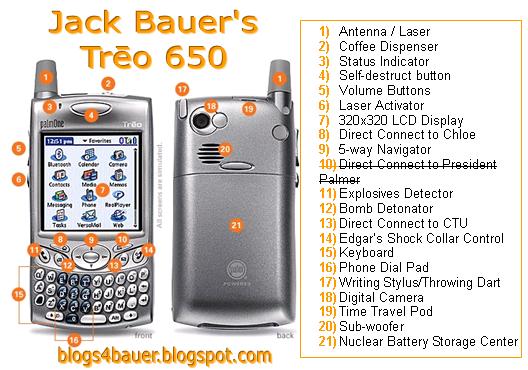
I think you are going to see more and more in-show product placement. "24" is good example of that. They use product placement to the point of parody. Last season featured various Cisco products as a guest stars. This season, it's Jack Baurer's PDA. It's a phone that gets reception everywhere, a camera, it can display the locations of terrorists in real time, and can blow them up (in selected service areas only). I wonder how much Sprint and/or Palm paid for a device that gets more air time than most of the cast.

But there's some big problems with product placements. Unless you go all skywalker over the video, those placements are permanent. When you syndicate a show, the stations that re-broadcast the show are provind free air time for the advertisers with the product placement. I don't see that as a long term solution.

I think you are going to see some form of collaboration between the advertisers and the DVR vendors. Tivo already has hooks in some commercials provide an option for the user to download targetted advertising. With the Tivo hardware, there can be two-way communication between the content and the viewer. That's where the future of TV will be heading.


Demoed FinalBuilder at TVUG

Last month I demoed FinalBuilder at TVUG. That was an interesting experience. I have managed to spend my entire career without having to do a public presentation. I was supposed to do one at the '98 BorCon on QuickReport, but I got bumped by another presenter who wanted that glory. He did his presentation using a version of QuickReport that was not ready for prime time and he told me later (before he found out that I was the person that he bumped) that it was a very unpleasant experience.

But, as Earl says, "That's Karma". I strayed enough from the topic. I've been using FinalBuilder for a couple of months now and I love it. FinalBuilder is an automated build and process management tool that is easy to use and extremely powerful. I use to build our applications and to deploy them to our QA environments. What I used to do with limited batch files, I now have a full IDE for design and powerful error handling. Plus reports and email notifications.

Shawn Gwin of TVUG asked me to do a presentation on FinalBuilder. I created a basic FinalBuilder project that would run from a non-networked laptop. It did the following:
  • Retrieved the latest source from Visual Source Safe for the sample project. In real life, I use Vault, but for the purposes of this demo, VSS was safe enough to use.
  • Read version number and other resource information from a file. I store the version number parts in a .ini file and include in source control. This makes it easy to control the version number in a multiple user environment.
  • Built that project with Delphi. TVUG is a .NET group, but for this demo, the actual compiler used really didn't matter.
  • Create an installer for the application using Wise for Windows.
  • Sent an email to myself that the build was successful.
  • Created text and HTML versions of the build log.

This project had full error handling and enough smarts to only compile when the files had changed. All of this is easy to do with FinalBuilder, no scripts were written.

Since this was a user group presentation, I was bound by law to use a PowerPoint presentation. You can make the argument that Powerpoint is used way too much, but since this was my first presentation ever, I needed all the support I could get. I ended up creating a basic PowerPoint deck to provide a frame of reference for the presentation. I'm not big on PowerPoint special effects, so I used no graphics and both colors (black and not black). As it ended up, I never used my presentation.

I emailed the FinalBuilder people and told them I was doing a presentation and asked if they had any tips. They promptly sent back a few suggestions and a nicely PowerPoint deck to use. I started off with their presentation and then went straight into my demo project and walked through each line for the group.

The group. This was not a well attended presentation. I believe that there may have been nearly 10 people total. Of that 10, maybe 5 people had any real interest or understanding of what they could use FinalBuilder for. That was kind of a letdown. I don't know if that was just a bad month or if the people that usually come had no interest in a build tool.

Thursday, March 23, 2006

Enhanced version of sp_who

I often use sp_who and sp_who2 to see who is connected to what on our development database server. When we need to restore a database, I need to make sure no one else is connected and sp_who is a quick way to get that information. The annoying part is that it displays every connection to every database, you can't filter by database. Vyas Kondreddi wrote a decent version that he named sp_who_3. It does pretty much what sp_who does, exception it takes lots of optional parameters that let you filter the data. I tweaked his code a little bit, but it's good stuff.

Technorati Tags:

Wednesday, March 01, 2006

My web application is running at 98% of the CPU

We are in the middle of testing a new web application and we have 7 instances of it running on 2003 Server box. Each instance has a web page virtual directory and a web service virtual directory. Some of the web services are on another box, but more of the bits are on this server. I was doing some related file cleanup on this box and it felt a little sluggish. A quick peek at Task Manager showed both processors (dual Xenon) were pegged at 96% to 99% of the CPU, in the w3wp.exe process. This is the process that manages the application pool in IIS6. I had all of the sites running in the same default app pool and it was imposible to tell which site was causing the spike, or if it was caused by just having a single app pool.

With one app pool, it's imposible to tell which site or sites is eating up the CPU cycles. I went in created application pools for each web site and web service folder and then assigned each site/service to it's application pool. This gets me a few things. First of this is how it's supposed to be set up in the first place. Each site will will get it's own process and I can use the iisapp.vbs script to list each app pool with it's process id and the associate site assigned to that pool. That should fix the problem or at the very least narrow down the list of the usual suspects.

Technorati Tags:

Tuesday, February 28, 2006

When to use cursors

This is cool article that describes a good reason for using cursors. The knee jerk reaction from most SQL Gurus is usually "Cursors bad, sets good". But there are times where it actually makes sense to use a cursor over set logic. Adam Machanic describes a few ways to generate a running sum of one of the columns of data in a record set. His gut reaction was to use varies combinations of self-joins, but the performance was hideous. For each row, you have to sum the values of all of the rows preceding, the performance cost is exponential to the size of the result set.

When he rewrote the query to use a cursor, the performance was dramaticly better, each row only needed to be read once. The performance cost was linear to the number of rows read.

If you stand back and look at the big picture, you may still want to avoid the cursor and just accumulate the running total in the code that is calling the query. That may prove to be the fastest way to execute this type of query.